 experience6 years
Dmitriy R.
PC and laptop diagnostics technician
A technician arrives within 60 minutes anywhere in the city. Free diagnostics.
Our own technicians4 to 20 years of experience




Repair prices
Symptoms Toshiba laptop owners most often come to us with.
power supply, power button, or board failure
from10 000 ₸
dust in the heatsink, worn fan
from4 500 ₸
ribbon cable, stuck keys, worn contacts
from6 500 ₸
port, power adapter, worn battery
from10 000 ₸
module, antenna, or driver
from8 500 ₸
worn drive, faster performance
from5 500 ₸
matrix, ribbon cable, or lid
from6 500 ₸
ribbon cable, settings, or worn sensor
from6 500 ₸
1–2 hourstime
from 5 500 ₸cost
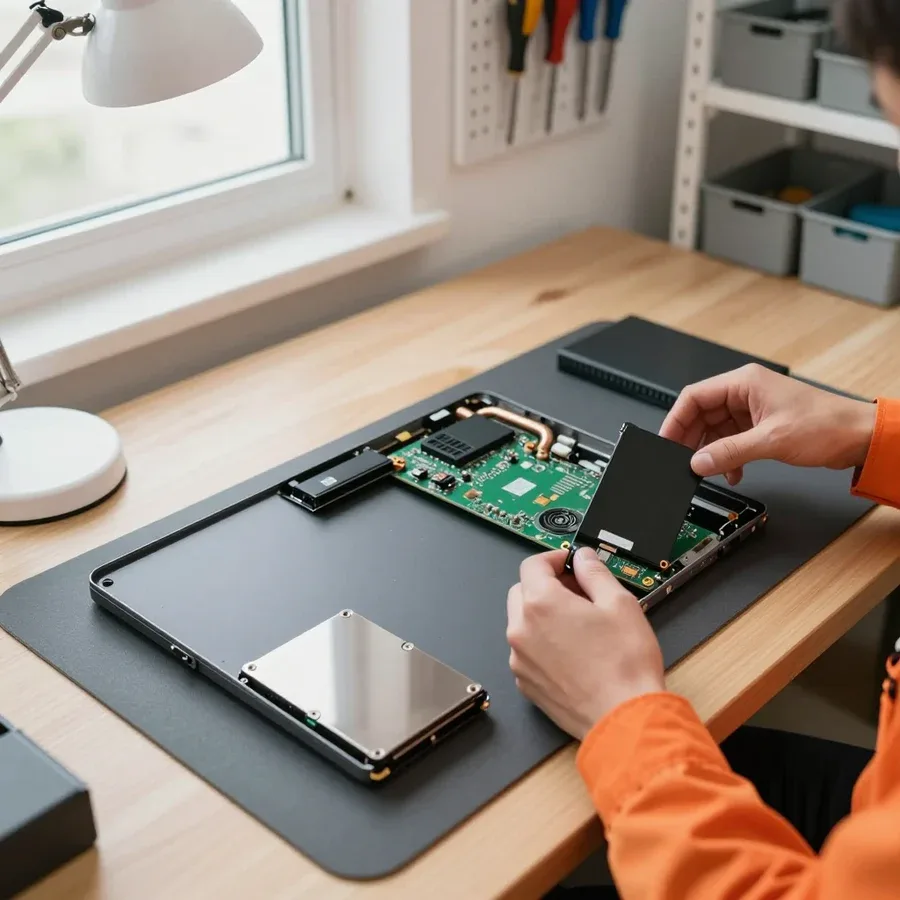 BeforeAfter

From request to post-repair check.
We take your request and assign it a status for further work.
The technician confirms a convenient time slot and location for the visit.
The technician identifies the cause of the fault and the repair cost.
You approve the scope of work and the price, and the technician starts.
The work performed is checked against the approved scope and any issues are noted.
The computer and laptop repair department in Almaty has 7 technicians with 6 to 15 years of experience.

The department has 7 specializations — they are listed on the technicians' cards.
experience6 yearsPC and laptop diagnostics technician
 experience8 years
Laptop repair engineer
 experience7 years
PC and laptop repair technician
 experience10 years
Graphics card repair technician
 experience10 years
Software installation specialist
We reply during working hours
Include your Toshiba laptop model and the symptoms in your request so the technician brings the right tools and parts.

Warranty question? Call us
+7 (778) 746 01 65
Author: Dmitriy R.,PC and laptop diagnostics technician
Published
Updated
Tech Service repairs Toshiba laptops in Almaty with its own technicians, each with 4 to 20 years of experience. A technician arrives at your home within 60 minutes anywhere in the city, or you can drop off the device at the service center. Diagnostics are free, there's a 1-year warranty on labor and parts, and you can pay any way you like.
Toshiba laptops tend to have the same recurring issues—from the power circuit to the cooling system. Below we break down common symptoms, their likely causes, and what a technician does when servicing Toshiba devices in Almaty.
During diagnostics, we first check the power circuit and charge controller, because a lit indicator with a black screen usually means the board is getting power but not starting up. The technician opens the case and tests the charging circuits on the motherboard, measures standby voltages, and inspects the controller for signs of overheating. We also check whether the unit has gone into protection after a liquid spill or power surge—oxidation and swollen components are visible under magnification. This kind of Toshiba laptop repair in Almaty starts with free diagnostics, so we give you the verdict and scope of work before disassembly. If the device is unresponsive after liquid damage or a power drop, don't press the power button dozens of times: the pulses further damage the charging circuits and make board recovery harder.
We fix Toshiba overheating by cleaning dust from the cooling system and replacing thermal paste so heat can again dissipate from the processor through the heatsink and fan. The technician removes the heatsink, cleans clogged fins, applies fresh compound to the die, replaces thermal pads on the video memory, and checks how the fan ramps up under load. The symptoms are familiar: the case gets hot near the keyboard, the fan runs continuously, and the device shuts down in demanding programs or games. Moreover, if the failure happens under load rather than right after startup, the cause is more often a clogged heatsink than the processor itself. It's worth doing maintenance before the fan gets really loud—then replacing the thermal paste has no consequences for the video memory and chipset.
When a Toshiba doesn't detect the charger, we check three components in order—the power jack, the battery, and the charge controller—because the symptom is the same but the cause can be any of them. The technician inspects the jack for looseness and signs of overheating, tests the contacts, checks the battery under load, and measures whether voltage reaches the charge controller and stays stable. The power jack wears out from frequent plugging and cable bending, so if charging is intermittent, check it first rather than replacing the battery right away. Around the city, a technician arrives within 60 minutes, so we often identify the cause on site. We provide a 1-year warranty on labor and parts—if the symptom returns, we'll take another look.
Toshiba indicators communicate through color and blinking—technicians use them to read the state of the electronics. Here's what these signals mean and when it's time to call a specialist.
During diagnostics, we read a blinking indicator on a Toshiba as the electronics signaling a problem with power delivery or charging, not as a standalone failure. The controller compares the input voltage and battery voltage and uses flashes to report a discrepancy: a drop in the charging circuits, a faulty adapter, a worn battery cell, or a glitch in the chip itself. On Satellite and Tecra models, the blink sequence differs, and on some devices the same signal is duplicated on the keyboard. In our experience, most such cases are resolved at the level of charging circuits and the jack; it rarely comes to replacing the motherboard. The number and rhythm of blinks vary by model, so before the technician arrives, it's worth recording a video of exactly how the light behaves—this speeds up diagnostics.
If the indicators don't respond at all, we check the electronics power and charging circuits, because a complete lack of signals usually points to a power delivery issue rather than the screen. The technician tests the input circuit from the port to the controller, checks the protection components, and verifies whether voltage reaches the motherboard with the adapter connected. Dead indicator lights often go hand in hand with no response to the power button — that narrows the search down to the power supply node. At Tech Service, the work is done by our own technicians, not subcontractors, so the same specialist handles diagnostics and repair. Before diagnostics, it helps to recall whether there was a power surge or liquid spill — that detail helps the technician find the cause faster.
For Toshiba, we handle everything from simple replacements to complex board repairs. Below is what each service includes and when it's needed.
We replace the Toshiba laptop matrix when the screen is cracked or shows no image, but before replacing we check whether the black screen is actually caused by the graphics card or the ribbon cable. Cracks, lines, dark spots in the corners are signs of physical damage to the panel itself, and then only a new one will help. If the picture appears but disappears when you tilt the lid or flickers, the technician first tests the ribbon cable and checks the connector contact: corrosion or a worn wire produce the same symptoms as a dying matrix. The graphics card is less common on this list, but it's also ruled out before ordering a part. We do the work at our own facility, and the replacement comes with a 1-year warranty. When flickering happens at an angle, it's often the ribbon cable rather than the panel — worth checking before ordering a part.
We first try to repair the Toshiba motherboard — by soldering circuits and connectors — and only if that's impossible do we discuss a full board replacement. Most often the charging and power circuits are affected: due to a voltage surge or liquid spill, they stop holding current, and the laptop either won't turn on or won't charge. The technician tests the traces, finds the burnt component, and replaces it precisely without touching working parts. Full board replacement is a last resort, used when the PCB is charred or multiple layers are damaged at once. We provide a 1-year warranty on labor and installed components. If liquid was spilled, the chance of saving the board is higher if the laptop was turned off immediately and not powered on again — corrosion spreads faster with current.
| Service | What it fixes | When it's needed |
|---|---|---|
| Screen replacement | no image, cracked screen | cracks, lines, black screen |
| Motherboard repair | won't turn on, won't charge | liquid spill, voltage surge |
| Cleaning and thermal paste replacement | overheating, shutdowns | fan noise, hot chassis |
| Power jack repair | not detecting charger | loose or damaged port |
| Repair after disassembly | won't start after tampering | DIY disassembly |
Owners of Satellite laptops often wonder whether it's worth investing in repairing a machine that's more than five to seven years old. Let's break down what the decision depends on and when taking it to a technician makes sense.
We do service old Toshiba Satellite laptops, and our technicians with 4 to 20 years of experience take on machines that other services refuse to look at. The line was produced for decades, and within a single series you'll find different platforms: early units on Celeron and Pentium, later ones on Core. Parts for some of these machines are out of production, so each model gets a specific approach: sometimes we replace the power jack, sometimes we clean the cooling system and refresh the thermal paste, and on some boards we resolder individual components. On older models, the power jack and cooling system tend to wear out more often, so preventive maintenance extends their life more noticeably than replacing individual parts. Before disassembly, the technician checks the condition of the cables and hinges — on old cases they crack over time, and it's better to fix this small issue at the same time so you don't have to take it apart again. Diagnostics are free, so inspecting such a machine costs the owner nothing.
Repair follows clear steps — from request to final check. Below we go through each stage and the result you get in the end.
After you request service, a technician arrives at your home within 60 minutes anywhere in the city, or you bring the laptop to the service center, and then free diagnostics begin. On-site, they inspect the device, check the power, cooling system, and condition of the ports, and at the service center they add disassembly and power circuit measurements to the inspection. You don't pay separately for the inspection and finding the cause — based on the results, the specialist gives you the cost of work. Toshiba laptop repair in Almaty starts with this stage: without identifying the cause, any part replacement becomes guesswork. During diagnostics, it's worth explaining how the failure shows up — after a spill, under load, or when plugging in the charger — this narrows down the causes and speeds up the search.
After diagnostics, we agree on the work with you and give you the cost, and only then does the technician start. You hear in advance exactly where the fault is, which parts are being replaced, and why the laptop won't start without it — this answers the question "what am I paying for." Then they perform the work: clean the cooling system, replace thermal paste, restore the power circuit, or replace the screen if that's the cause. We work both on-site and at the service center, so the scope of work is tailored to the location: some operations are easier to do at your table, others require disassembly on-site. Approval before work begins protects you from unexpected expenses — you know in advance what's being done and why, and you can decline anything unnecessary.
We provide a 1-year warranty on labor and parts, and if the laptop won't turn on again after repair, it's a warranty case. The warranty covers both at once: the technician's work and the installed part, so you don't pay twice if the problem returns. If the issue comes back, just describe the symptom — the technician will recheck the device and determine whether it's related to the previous repair. When you drop off the device, ask which part was replaced and which component was checked: this helps the technician quickly match the new fault to the previous work and avoid taking apart working components again. In my view, this is the point owners check most often before handing over their equipment: a year of coverage on the part is a clear timeframe to see whether the replacement was quality.
Here's a summary of Toshiba laptop failures and how we work: below are five takeaways that most often determine the outcome of a repair.
Tech Service technicians repair other appliances too — with the same 1-year warranty on labour and parts.
 Refrigerator Repair in Almatyfrom 3 000 ₸
 Washing Machine Repair in Almatyfrom 3 000 ₸
 Dishwasher Repair in Almatyfrom 3 500 ₸
 Oven Repair in Almatyfrom 3 000 ₸
 Cooktop Repair in Almatyfrom 3 500 ₸
 Air Conditioner Repair in Almatyfrom 3 500 ₸
 Boiler and Water Heater Repair in Almatyfrom 2 500 ₸
 Freezer Repair in Almatyfrom 6 000 ₸
 Tumble Dryer Repair in Almatyfrom 5 000 ₸
 Coffee Machine Repair in Almatyfrom 2 500 ₸
 Robot Vacuum Cleaner Repair in Almatyfrom 3 500 ₸
 Vacuum Cleaner Repair in Almatyfrom 1 500 ₸
 Microwave Oven Repair in Almatyfrom 2 000 ₸
 Hair Dryer Repair in Almatyfrom 1 500 ₸
 Iron Repair in Almatyfrom 3 000 ₸
 Electric Kettle Repair in Almatyfrom 2 500 ₸
 Mixer Repair in Almatyfrom 2 500 ₸
 Multicooker Repair in Almatyfrom 500 ₸

If your laptop screen is broken, turn the device off first, don't press on the display, and check the picture through an external monitor.
12 March 2026 · 11 minutes read
If your laptop freezes, the first thing to do is restart it and check Task Manager to see what's loading the CPU and memory.
25 January 2026 · 12 minutes read
If your laptop won't boot, first determine which of two states you're in: the device doesn't respond to the power button at all…
13 December 2025 · 12 minutes read
If your computer won't turn on, start simple: check the outlet, power cable, switch on the power supply, and the power button.
19 January 2026 · 13 minutes read








