Genuine
Sony part
- Compatibility
- Full compatibility with DualSense
- Selection
- By part number and model
- Effect on sticks
- Standard performance, no changes
- Price
- After diagnostics

Free diagnostics, a technician at your door in 60 minutes anywhere in the city. 1-year warranty on labor and parts.
Our own technicians4 to 20 years of experience




1 yearwarranty on labor and parts
60 minutestechnician to your door
freediagnostics
5
Five common symptoms DualSense owners bring in for repair. Each points to a specific part: stick, button, trigger, wireless module, or battery. The technician finds the cause during free diagnostics.
Stick drift
The character or camera moves without input. The cause is potentiometer wear or dirt in the stick mechanism.
Button doesn't respond
The press isn't registered or takes extra force. Dirty contacts or a worn membrane are often to blame.
Trigger squeaks or wobbles
The trigger squeaks, has play, or sticks. The cause is wear on the trigger hinge or spring.
Gamepad won't connect
The console doesn't see the controller over Bluetooth or cable. The port, wireless module, and board are checked.
Stick sticks or moves stiffly
The stick takes effort to move or gets stuck. The cause is mechanical damage or dirt in the mechanism.
Check the stick in the calibration menu: if the cursor drifts on its own, it's drift, not dirt.
Describe the symptoms1–2 hourstime
from 5 000 ₸cost
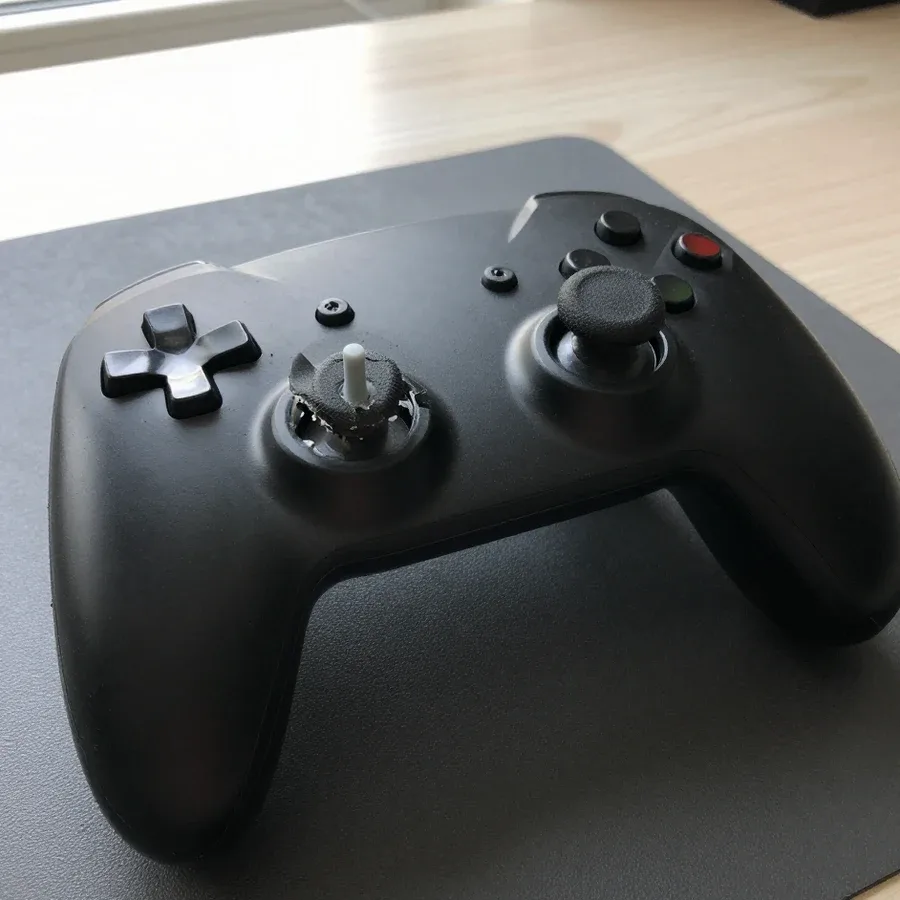
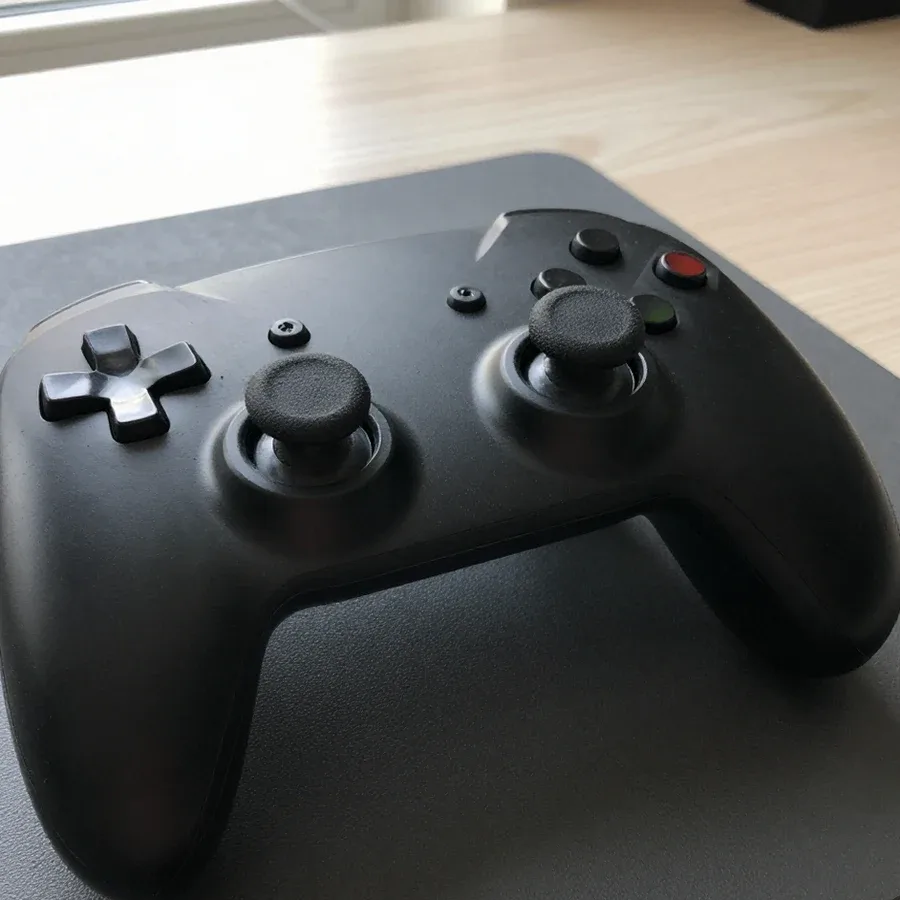 BeforeAfter
The digital device repair department in Almaty has 7 technicians with 7 to 18 years of experience.

The department has 7 specializations — they are listed on the technicians' cards.
 experience7 years
Game console repair technician
 experience10 years
Senior TV repair technician
 experience10 years
TV board repair technician
 experience10 years
Electromechanical technician
 experience13 years
Audio and DVD repair technician
We reply during working hours
Describe the problem in your request, and the technician will arrange a convenient visit time. 1-year warranty on labor and parts. Ask about part availability and payment.

Warranty question? Call us
+7 (778) 021 13 16
Author: Bakdaulet E.,Game console repair technician
Published
Updated
Tech Service repairs Sony DualSense controllers in Almaty as a direct provider with its own technicians. A technician comes to your home within 60 minutes anywhere in the city, diagnostics are free, and we give a 1-year warranty on labor and parts. The technician quotes the price after diagnostics, and you can pay via Kaspi QR, Kaspi Red, bank card, cash, or bank transfer for companies.
The DualSense controller wears out faster than the console itself — sticks, triggers, and the battery are usually the first to go. Here's what each symptom means and how a technician handles it.
Stick drift on the DualSense is fixed by replacing the stick module — we replace the worn module, not the whole controller, and after the work we check the movement of both sticks. Analog sticks are the most heavily used part: under the cap sits a potentiometer that wears down from constant rotation, and the center position stops registering. Buttons and membranes wear differently — contact is lost due to dirt or the graphite layer being pressed through, while the controller board usually stays intact. The technician opens the case, removes the module from the shaft, installs a new one, then checks response around the circle and in the center. If the character "drifts" in only one game, it may be a dead zone in the settings rather than hardware — that's why we start diagnostics by testing in different apps. This is the most common reason PS5 controller repair in Almaty begins — almost every controller owner knows stick drift.
We restore the DualSense L2/R2 adaptive triggers, as well as the USB-C charging port and the wireless module — these are separate components, and each is diagnosed by its own symptom. When the trigger stops resisting, the tension mechanism inside the trigger is to blame: the spring or micro-motor loses its range, and haptic feedback disappears. The USB-C port loosens from frequent connections — contact is lost when the cable wiggles, and charging becomes intermittent. The battery drains faster than usual as its cells wear out, but it's not always the culprit: a short on the board can also speed up discharge, which the technician sees when testing power circuits. If the controller works wired but won't connect via Bluetooth, the problem is more often the wireless module, not the battery — don't rush to replace the battery.
After liquid damage or a drop, we first diagnose the controller board and flex cables — whether the device can be restored depends on their condition. Liquid leaves corrosion on the board that eats away traces and shorts contacts, while a drop bends the case mounts and tears the touchpad and button flex cables. The touchpad stops responding when the flex cable is torn or has come loose from the connector — the sensor itself is often fine. The technician opens the case, inspects the board, cleans corrosion, and checks the integrity of the flex cables, and assesses cracked case mounts separately — they determine whether the board stays in place after reassembly. The sooner the controller gets to a technician after liquid damage and the less it was turned on, the higher the chance of getting by with just cleaning the board without replacing components.
The question "fix or buy new" is decided by the condition of the components, not emotions. Here's which parts can be restored and which are replaced entirely.
| Component | What we do | When it's replaced entirely |
|---|---|---|
| Sticks | Replace the stick module | When the mechanics wear out and drift appears |
| L2/R2 triggers | Repair or replace the component | When the mechanism is destroyed |
| Battery | Replace if it drains quickly | When it loses capacity |
| USB-C port | Restore contact | When mechanically torn |
| Board | Diagnostics and cleaning | When irreparably damaged |
Restoring the controller isn't worth it when the controller board is irreparably damaged or the casing with its mounts is destroyed — replacing parts won't bring the gamepad back to life. The controller board connects the sticks, triggers, and buttons into a single circuit: if the traces are burned or the pads are torn off, soldering won't restore conductivity, and any new stick module simply won't receive a signal. A casing with cracked mounts holds the board at an angle, causing the sticks to shift and drift to return. A broken touchpad or stripped screw threads is also a reason to consider replacement more sensible than repair. The decision is made after free diagnostics: the technician shows which part has failed and explains what restoration will and won't achieve. In my opinion, it's more honest to tell the owner right away that the repair won't pay off than to take the device in just for a formal order.
A gamepad is compact, so the technician doesn't have to bring it to the service center — diagnostics and restoration often happen right at your home. Let's walk through the whole path from request to post-repair check.
We come to the client within 60 minutes anywhere in the city — the technician arrives at your home, diagnoses the gamepad, and if the breakdown allows, fixes the issue on the spot. During the visit, the technician performs typical tasks: replacing sticks, cleaning the button mechanism, checking the board and flex cables. This format is convenient for console owners — no need to go anywhere or leave the device at a service center. If board-level repair or a time-consuming part replacement is needed, the work is done at the service center. When you request service, specify exactly what's wrong with the gamepad: from the description, the technician will immediately understand whether a home visit is enough or a workshop repair is needed. The more accurately you describe the symptom, the faster the technician will know which part to work on.
Diagnostics are free with us, and after the work the technician checks the gamepad — sticks, triggers, buttons, charging, and connection to the console. First, they identify which part has failed: the stick potentiometer, the adaptive trigger mechanism, the button contacts, or the charging circuit. Then they replace the failed components and reassemble the controller. The technician quotes the price after free diagnostics, once it's clear which part has failed — so you pay for specific work, not a "blind diagnosis." The completed work and installed parts come with a 1-year warranty. After reassembly, the technician connects the gamepad to the console and goes through all controls to make sure drift and sticking haven't returned.
We repair PlayStation gamepads specifically, not just consoles. Here's which controller lines we take in and which parts we check during diagnostics.
We repair Sony DualSense gamepads for PS5, including DualSense Edge, as well as DualShock 4 — for each line, the technician checks its own parts. On the base controller, stick modules and adaptive L2/R2 triggers are responsible for resistance and response in games; on the Edge, there's also a swappable stick design and profiles; and the DualShock 4 has its own button membranes and touchpad. That's why our PS5 gamepad restoration in Almaty starts with identifying the exact revision so we don't mix up versions. We repair PS5 gamepads in Almaty for each of these lines, and since the Edge and base DualSense have different stick and trigger designs, the technician tailors diagnostics and part replacement to the specific device rather than following a generic scheme.
Gamepad repair is all about trusting the technician. Here's what warranty we provide, how payment works, and why we're the direct contractor, not a middleman.
We give a 1-year warranty on labor and parts — it covers both stick replacement and trigger restoration. The condition is the same for any breakdown: if the unit we replaced or restored fails again, we'll sort it out under warranty. Tech Service is a direct contractor with its own technicians who have 4 to 20 years of experience, so the same service that did the work is responsible for the result, not a middleman. We specialize in gamepads: DualSense, DualSense Edge, and DualShock 4 — this is our main focus, not a rare service buried in a general price list. In my view, the value of a direct contractor is that you don't have to chase down who's responsible between the front desk and the technician. Before handing over your device, ask exactly which units the warranty covers — it's easier to align expectations with what's guaranteed to you.
The technician gives you the price after free diagnostics, once it's clear which unit needs restoration or replacement. Diagnostics are free: first we figure out the cause, and only then you discuss the final amount for labor and parts with the technician. We don't list numbers in this article — they depend on the specific breakdown and whether a unit needs replacement or just contact restoration. You can pay via Kaspi QR, Kaspi Red, bank card, cash, or bank transfer for companies. In practice, this is more convenient than a fixed price list: stick drift and a sticky button require different amounts of work, and you don't pay for a breakdown that doesn't exist. Ask the technician what's included in the price before work starts — that keeps the calculation transparent for both sides.
Here's a quick summary: what most often breaks in a controller, which units can be restored, and under what terms the technician works.
If you ask, the technician will check other parts during the same visit.

If your laptop screen is broken, turn the device off first, don't press on the display, and check the picture through an external monitor.
12 March 2026 · 11 minutes read
If your phone won't charge, start by checking the adapter, cable, and port, then the charging settings.
16 February 2026 · 12 minutes read
If your laptop freezes, the first thing to do is restart it and check Task Manager to see what's loading the CPU and memory.
25 January 2026 · 12 minutes read
If your phone falls in water, take it out right away, turn it off, and don't charge it.
19 January 2026 · 12 minutes read
If your phone camera isn't working, first check app permissions, clear the cache, and restart your phone — this fixes some software glitches.
24 December 2025 · 13 minutes read
If your laptop won't boot, first determine which of two states you're in: the device doesn't respond to the power button at all…
13 December 2025 · 12 minutes read


