 experience6 years
Dmitriy R.
PC and laptop diagnostics technician

A technician arrives within 60 minutes anywhere in the city. Diagnostics are free.
Our own technicians4 to 20 years of experience




Repair prices
Below are common symptoms and their likely causes. The technician will determine the exact cause after a free diagnostic.
power, button, charging circuit
from10 000 ₸
dust, thermal paste, fan
from6 000 ₸
fan, bearing, mounting
from4 500 ₸
liquid on the board, corrosion, oxidation
from11 500 ₸
memory, disk, drivers
from5 000 ₸
connector, battery, controller
from10 000 ₸
pressure, impact, hinges
from10 500 ₸
wear, liquid, mechanism
from11 500 ₸
1–2 hourstime
from 10,000 ₸cost
 BeforeAfter

Five steps from request to checking the work.
Leave a request and the technician will confirm the visit details with you.
The technician will arrive anywhere in the city within 60 minutes after your request.
The technician will ask how long ago the symptom appeared, whether the laptop was spilled on, and if any parts were replaced before.
You approve the scope of work and the cost, and then the technician starts.
Ask the technician how often to clean the cooling system and what loads to limit after repair.
The computer and laptop repair department in Almaty has 7 technicians with 6 to 15 years of experience.

The department has 7 specializations — they are listed on the technicians' cards.
experience6 yearsPC and laptop diagnostics technician
 experience8 years
Laptop repair engineer
 experience7 years
PC and laptop repair technician
 experience10 years
Graphics card repair technician
 experience10 years
Software installation specialist
We reply during working hours
Send us your laptop model, the symptom, and a convenient time — the technician will arrive prepared.

Warranty question? Call us
+7 (778) 021 13 16
Author: Dmitriy R.,PC and laptop diagnostics technician
Published
Updated
Tech Service is a direct laptop repair provider in Almaty: our technician comes to your home within 60 minutes or repairs it at our service center. Diagnostics are free, you get a 1-year warranty on labor and parts, and the technician quotes the price after diagnostics. Our technicians have 4 to 20 years of experience, and you can pay via Kaspi QR, Kaspi Red, bank card, cash, or bank transfer for companies.
The right steps in the first few minutes often determine whether a single component replacement will do or the board needs to be restored. Here are three common scenarios: liquid spill, no power-on, and overheating.
Turn off the device immediately, unplug the charger, and do not power it on again until diagnostics. Moisture seeps through the keyboard to the motherboard and settles on power circuits, where corrosion starts eating away contacts and traces. Coffee, tea, sugary drinks, and water act differently: sugary liquids leave a sticky layer that speeds up oxidation, while water causes a short circuit the moment it hits. Blotting the surface with a napkin and drying with a hairdryer is not enough—it drives moisture deeper into the board. If several days have passed since the spill and the device still works, don't put it off: hidden corrosion shows up weeks later as a sudden failure. Even when the laptop works after a spill, the liquid starts corrosion on the board—the sooner it's removed, the fewer traces will need restoring. If your laptop has been spilled on, it's best not to delay: we start liquid damage recovery with a board inspection.
Severe heating and fan noise usually mean a dust-clogged cooling system and dried thermal paste. Dust builds up between the radiator fins and blocks airflow; the fan runs at max speed but heat can't escape. Thermal paste between the CPU and heatsink dries out over time and stops conducting heat, and thermal pads on the circuits lose their elasticity. Using the laptop on a soft surface—like a couch or blanket—blocks the vents underneath and makes it heat up more even with a clean cooling system. Cleaning out dust, replacing thermal paste and pads restore normal temperatures if the fan and heatsink are intact. While the device overheats, it throttles itself—so "slowness" may not be a separate fault but a result of overheating.
The same symptom can point to different components. Below is how technicians link laptop behavior to the likely cause and the repair stage.
If the matrix is physically damaged, we replace it entirely, but with a "black screen" and no cracks, we first check the cable and board. Cracks in the glass and lines on the image are the physics of the matrix: it cannot be restored, the whole module is replaced as a unit. A completely different scenario is an intact matrix with no signs of life: here the technician connects an external monitor to see if the video subsystem is alive, checks the cable for kinks, and inspects the connector on the motherboard. If there is an image on the external screen but not on its own, the cause is in the matrix or cable, not the graphics. In our experience, such cases more often end with a cable replacement than an expensive matrix. A cracked matrix and no image with an intact matrix are different repair scenarios, and confusing them is costly for the owner. If you need laptop service in Almaty, the technician will first determine what exactly failed and offer a suitable repair option.
Slow performance is more often due to overheating or the storage drive, while a non-working keyboard is due to liquid damage or cable wear. When the system "lags", the technician checks the temperature under load: a dust-clogged heatsink throttles the CPU, and the device feels slow even with working hardware. The second suspect is the storage drive: HDDs develop bad sectors, SSDs wear out, and the disk queue stretches loading times. With the keyboard, the logic is different: some keys don't work after liquid damage, lines or complete failure are due to a damaged cable, and chaotic character repeats are due to worn contacts. Before offering a keyboard replacement, it's worth ruling out a software cause and cable damage — this is cheaper for the client and more accurate for the diagnosis.
Our technician performs some work right at the client's location, while other tasks require service center conditions. Below we honestly explain what is done on-site, what is taken to the workshop, and how quickly the specialist arrives.
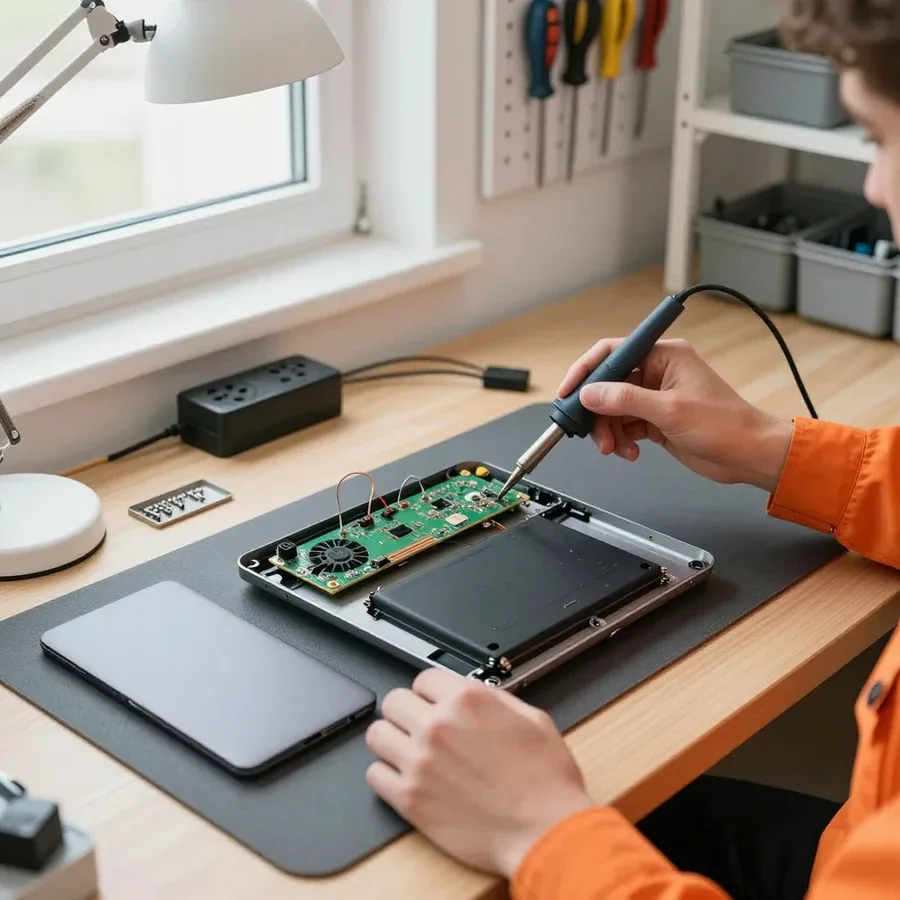
Component-level motherboard repair, restoration of power circuits, and post-liquid-damage work are performed in the service center, where there are conditions for precise soldering. At home, you can't lay out the schematic, heat the board under a microscope, or replace a burnt controller — this requires a workbench, lighting, and measuring instruments. If diagnostics show damage to traces or microchips, the technician takes the laptop and explains which components need to be restored. Disassembling the board at home without the necessary equipment risks worsening the damage, so such work should not be rushed and is best left to a stationary workshop. According to the experience of our specialists with 4 to 20 years of tenure, careful soldering under control saves the client from replacing the entire board.
A technician arrives within 60 minutes anywhere in the city, and free diagnostics start as soon as they arrive. You can request service by phone or on the website: just tell us your laptop model and describe what's happening — it won't turn on, it's overheating, liquid was spilled on it. The specialist comes with their own tools, opens the case in front of you, and identifies the cause of the problem. If the work can be done on-site, you get a working device during the same visit; if component-level repair is needed, the technician explains what they'll take to the service center. The more accurately you describe the symptom when you request service, the faster the technician will bring the right parts and tools, so you won't need a second visit. We accept payment in any convenient way, and the warranty is 1 year on labor and parts.
The difference between a direct contractor and a middleman is visible already at the diagnostics stage. Here's what a free inspection includes and which signs of honest service to look for when choosing.
Our free diagnostics means checking components and identifying the cause of the problem before any work begins, with no charge for the inspection itself. The specialist opens the case, examines the board for signs of liquid damage and overheating, checks the power circuit, RAM, storage, and cables, and tests the keyboard and screen. They also test the charging ports and screen hinges separately — that's often where the cause lies, hidden from the outside. Based on the inspection, the customer receives a conclusion: which component failed, what actions are needed, and what to do first. Diagnostics is valuable not because it's free, but because afterward the person knows the exact cause and scope of upcoming work, not guesses. So ask them to state their findings before disassembly — this immediately shows the technician's qualifications and saves time on arguments. Laptop repair in Almaty price depends on the component and scope of work, and the technician quotes it after free diagnostics.
We restore the motherboard at the component level and bring power circuits back to life, rather than suggesting a board replacement at the first opportunity. The specialist tests the traces, looks for burned-out elements, replaces damaged capacitors and stabilizers, and restores power to the processor and memory. This approach preserves serial data and avoids ordering parts for a specific model. Replacing the board is often more expensive and riskier than component-level restoration, so the decision is made based on diagnostics, not a template. In my view, replacement should only be offered when the damage is incompatible with restoration — for example, when a multilayer board is charred and the inner layers are compromised. Component-level restoration isn't always possible, and the contractor must explain why it doesn't apply in a particular case.
Below are the main types of work and the laptops we handle. The technician determines the exact scope after free diagnostics, once they see the cause of the problem.
| Type of service | What we replace or check | When it's needed |
|---|---|---|
| Screen replacement | Display, cable, backlight | Cracks, lines, no image |
| Keyboard replacement | Keys, cable, controller | Keys stick or don't respond |
| Battery replacement | Battery, charge controller | Drains fast, won't hold a charge |
| Power jack replacement | Port, soldering, contacts | Cable won't stay in, charging cuts out |
| Storage replacement | SSD or HDD, mounts | Slow performance, not enough space |
| Cooling cleaning | Heatsink, fan, thermal paste | Noise, overheating, throttling under load |
We restore laptops after liquid spills and drops, including work on the case and hinges. With liquid damage, speed matters: the sooner the device gets diagnosed, the less corrosion has a chance to affect the board traces and connector contacts. After a drop, we check not only external damage but also internal mounts, cables, hinges and their seats — a crack in the case often leads to a misaligned lid. In our experience, recovery after liquid almost always starts with a complete disassembly and drying of components, not with trying to turn the device on. The technician assesses which components are affected and proposes a work plan. The faster the device reaches us, the less damage corrosion leaves on the board and connectors. The laptop repair technician plans the work so that the root cause is fixed first, and only then are external damages addressed.
Repair terms matter no less than the work itself. Here's what the warranty covers, what affects the cost, and how to pay for the work.
We provide a 1-year warranty on labor and parts, meaning we stand behind both the quality and the installed components. If the laptop stops turning on again, won't hold a charge, or shows an error on the same component, the technician re-examines that specific component — the operation and the part we installed. The warranty covers replaced parts: keyboard, screen, battery, power jack, screen cable — and the procedure itself, whether it's board soldering, thermal paste replacement or cooling system cleaning. Damage that occurs for another reason is not covered: liquid spills, drops or overheating after third-party intervention are separate cases. If the fault recurs within the warranty period, it's important to keep the work description — it helps us quickly determine whether the recurrence is related to our work or caused by another component. Laptop repair in Almaty, where prices depend on the component and scope of work, always starts with diagnostics, and only then do we quote a price.
We quote the price after a free diagnostics, once the cause and scope of work are clear. Before disassembly, only symptoms are visible: it won't turn on, it's noisy, it won't charge. Inside, the cause may be the power connector, the charging circuit on the board, or the battery itself — this determines both the set of operations and the parts needed. The final amount depends on the device class, availability of the required part, and how difficult it is to access the unit: on some models, memory and cooling are replaced after removing the bottom cover, while on others, disassembly down to the board is required. Work that demands precision is priced separately: replacing the power controller, restoring traces after liquid damage, reballing the video chip. Sometimes it's cheaper to restore an old laptop than to buy a new one — but that's only clear from the inspection results, not from a description of the symptom.
A laptop breakdown is handled with a clear algorithm: assess the symptoms, choose the repair format, and check the warranty terms. Below is a short summary to help you decide without extra trips or overpaying.
Tech Service technicians repair other appliances too — with the same 1-year warranty on labour and parts.
 Refrigerator Repair in Almatyfrom 3 000 ₸
 Washing Machine Repair in Almatyfrom 3 000 ₸
 Dishwasher Repair in Almatyfrom 3 500 ₸
 Oven Repair in Almatyfrom 3 000 ₸
 Cooktop Repair in Almatyfrom 3 500 ₸
 Air Conditioner Repair in Almatyfrom 3 500 ₸
 Boiler and Water Heater Repair in Almatyfrom 2 500 ₸
 Freezer Repair in Almatyfrom 6 000 ₸
 Tumble Dryer Repair in Almatyfrom 5 000 ₸
 Coffee Machine Repair in Almatyfrom 2 500 ₸
 Robot Vacuum Cleaner Repair in Almatyfrom 3 500 ₸
 Vacuum Cleaner Repair in Almatyfrom 1 500 ₸
 Microwave Oven Repair in Almatyfrom 2 000 ₸
 Hair Dryer Repair in Almatyfrom 1 500 ₸
 Iron Repair in Almatyfrom 3 000 ₸
 Electric Kettle Repair in Almatyfrom 2 500 ₸
 Mixer Repair in Almatyfrom 2 500 ₸
 Multicooker Repair in Almatyfrom 500 ₸

If your laptop screen is broken, turn the device off first, don't press on the display, and check the picture through an external monitor.
12 March 2026 · 11 minutes read
If your laptop freezes, the first thing to do is restart it and check Task Manager to see what's loading the CPU and memory.
25 January 2026 · 12 minutes read
If your laptop won't boot, first determine which of two states you're in: the device doesn't respond to the power button at all…
13 December 2025 · 12 minutes read
If your computer won't turn on, start simple: check the outlet, power cable, switch on the power supply, and the power button.
19 January 2026 · 13 minutes read








