experience10 years
Vasiliy Z.
Senior TV repair technician

We get your soundbar sounding right again — at your place or in our workshop. 1-year warranty on labor and parts.
Our own technicians4 to 20 years of experience




Repair prices
Below are the symptoms soundbar owners most often report. The technician pins down the exact cause after diagnostics.
power supply, capacitor, button
from9 500 ₸
speaker, amplifier, input settings
from3 000 ₸
torn cone, overload, amplifier
from6 500 ₸
module, firmware, pairing
from12 000 ₸
IR receiver, batteries, buttons
from6 000 ₸
connector, adapter, power controller
from6 000 ₸
overheating, protection, board
from8 000 ₸
memory, firmware, control board
from8 000 ₸
1–2 daystime
from 9 500 ₸cost
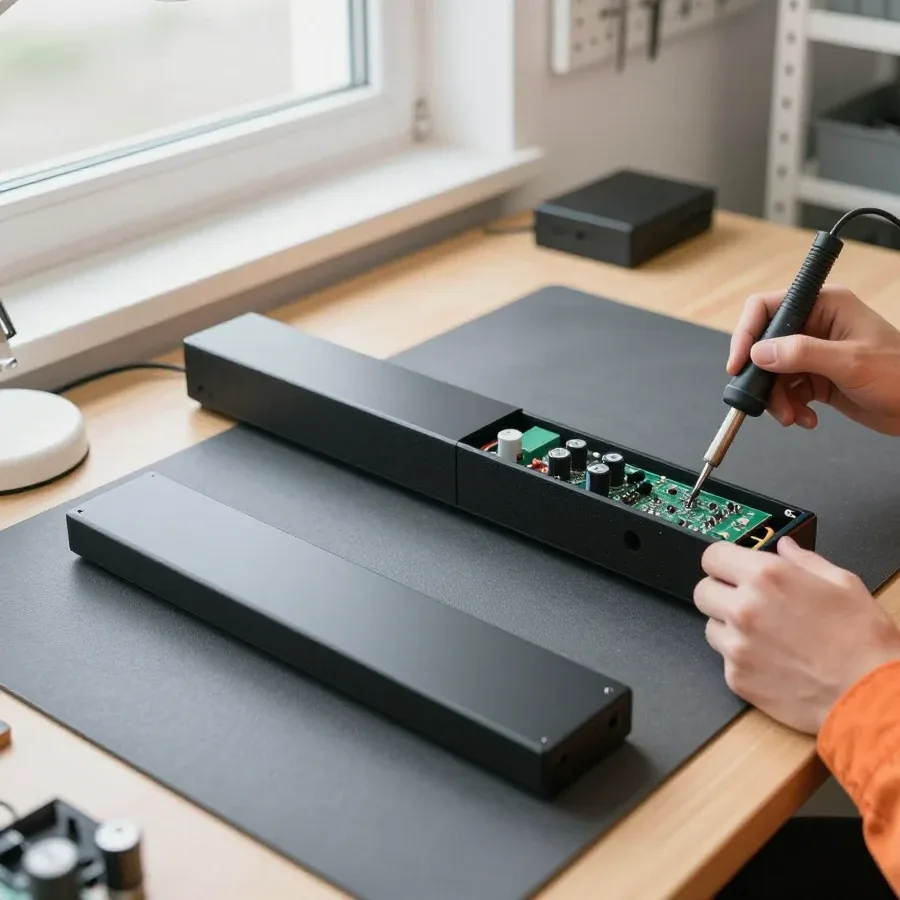 BeforeAfter

Five steps from request to checking the result.
Describe the symptom and your soundbar model so the technician brings the right tools.
Choose a convenient visit time and let us know about parking and access to a power outlet.
The technician runs diagnostics on site and agrees on the next steps with you.
Work starts once you approve the scope and price; you can pay via Kaspi QR, Kaspi Red, bank card, cash, or bank transfer for companies.
Make sure the sound, Bluetooth, and remote work, and check all functions.
The digital device repair department in Almaty has 7 technicians with 7 to 18 years of experience.

The department has 7 specializations — they are listed on the technicians' cards.
experience10 yearsSenior TV repair technician
 experience10 years
TV board repair technician
 experience10 years
Electromechanical technician
 experience13 years
Audio and DVD repair technician
 experience18 years
Smartphone repair technician
 experience8 years
Screen and battery replacement technician
 experience7 years
Game console repair technician
We reply during working hours
Have your soundbar model, symptom, and connection type ready for the call — the technician will bring the right tools and parts.

Warranty question? Call us
+7 (778) 021 13 16Tech Service repairs JBL soundbars in Almaty: our technician comes to your home within 60 minutes anywhere in the city, or the device is repaired at our service center. Diagnostics are free, the technician quotes the price after them, and there's a 1-year warranty on labor and parts. Technicians have 4 to 20 years of experience.
JBL soundbars are repaired, including after the warranty expires and those bought outside Kazakhstan. Let's look at why JBL specifics matter and how a direct contractor differs from an intermediary.
We service JBL soundbars with and without a subwoofer, including after the warranty expires and those bought outside Kazakhstan. We take on 2.1 models with a separate wireless subwoofer and home theater soundbar systems with multiple speakers and a separate control unit. Warranty status and country of purchase don't affect diagnostics: the manufacturer doesn't refuse service for a device bought in another country, and an expired warranty doesn't cancel the breakdown itself. We provide a 1-year warranty on labor and parts. The technician first determines what exactly failed, and only then discusses the repair — so you decide based on the real cause, not an assumption. JBL soundbar repair in Almaty starts with free diagnostics, after which the technician names the cause of the breakdown.
JBL soundbars have their own typical components — HDMI ARC/eARC, wireless subwoofer, Bluetooth module, and amplifier board — and they fail in characteristic ways. The HDMI port handles the connection to the TV and often suffers from overheating and frequent cable reconnections. The wireless subwoofer loses pairing with the main unit — that's a separate diagnostic path, not just 'no bass'. The Bluetooth module causes connection failures, and the amplifier board causes distortion and sound dropouts at high volume. Regular speakers don't produce this set of failures, and the signal path in them is different — without HDMI switching and without a radio link to the subwoofer. That's why diagnostics start with checking the soundbar's connection to the subwoofer and the HDMI port, not with general measurements — it finds the real cause faster.
We explain why a JBL soundbar won't turn on, the subwoofer is silent, it crackles at high volume, and why the unit turns itself off — and what's behind each symptom inside the case.
If a JBL soundbar won't turn on or shuts off after a few minutes, the power supply or its output circuits on the main board are usually to blame. The power source feeds the amplifier board and control module, and with a short or dried-out capacitors, the voltage drops right at startup. A quick shutdown after startup is a sign that the charge 'sags' under load, so you need to check not only the button but the whole path: input stage, converter, overcurrent protection. In practice, the technician first measures the voltages at the power supply output, then checks the control module traces — this rules out half the false theories about a 'dead' button. If the unit turns off at exactly equal intervals, look at thermal protection and converter overheating, not the switch itself.
When the soundbar works but the subwoofer is silent, or the sound crackles and pops at high volume, the cause is usually the speaker, the subwoofer channel, or the amplifier. Crackling that appears only at high volume often points to amplifier overload rather than the speaker itself — this changes the approach: replacing the speaker is pointless if the board is already outputting a distorted signal. Clicks and crackling in time with the bass are a typical sign of a damaged voice coil or broken lead wires. A silent wireless subwoofer is checked separately: the radio link, the receiver in its housing, and the power supply of its own module. The technician replaces speakers and the subwoofer, and also restores the channel if it has burned out on the board. Amplifier overload at volume peaks often triggers protection as well — then the unit goes into pause instead of producing distortion.
| Symptom | Likely cause | What we check |
|---|---|---|
| Won't turn on | Power supply, power circuits | Power to the board and amplifier |
| Turns off by itself | Voltage drop under load | Power circuit, protection |
| No sound, subwoofer silent | Subwoofer channel, connection to subwoofer | Wireless channel, speaker |
| Crackling and popping at volume | Amplifier, speaker | Amplifier board, speakers |
| No response to remote or buttons | IR receiver, body buttons | IR receiver, buttons |
| Moisture exposure | Board oxidation | Control board, contacts |
A blinking indicator, an unresponsive remote, and "forgotten" Bluetooth are signals that help the technician understand where to look for the fault before even opening the case.
A blinking indicator on a JBL soundbar signals the device's state or mode rather than being a separate "error." Constant blinking usually relates to an attempt to connect to a source or to switching between modes, while rapid blinking at power-on often indicates power supply protection: the board enters a startup cycle without completing the start. The indicator color is also informative — orange or red usually relates to power and charging, white or blue to pairing and input. The main board may be fine, and the fault comes from the input circuit or from a module that isn't responding to polling. The blinking pattern — frequency, color, simultaneity with the attempt to turn on — helps the technician narrow down the components before opening the case, so take a short video before your visit.
If the JBL soundbar doesn't respond to either the remote or the body buttons, the problem is more often in the IR receiver or the control board, not the remote itself. The remote controls the device via the IR receiver, and when the signal doesn't get through, the first thing to check is the remote's power source and the cleanliness of the receiver window — a dusty lens or a dead battery produce exactly the same picture. Then check the body buttons: if they're also unresponsive, the issue isn't the transmitter but the unit that receives commands and passes them along the circuit. The IR receiver and the control board ribbon cable often suffer from moisture and voltage spikes. When both the remote and the buttons fail at the same time, it almost always points to a common control unit rather than two independent failures — and that's what needs checking.
Before calling a technician, rule out the cable, the TV settings, and the port itself — this avoids an unnecessary visit and saves time for both sides.
Check the HDMI cable, the audio output in the TV settings, and another port — if there's no sound anywhere, the cause is most likely in the speaker. The ARC channel sends the signal from the screen to the speakers over a single cable, and a failure in any link of this chain looks the same: picture but no sound. First, try a known-good cable, then in the TV menu switch the audio output to ARC and enable CEC control. If the TV has a second ARC port, move the cable there — this tests the TV-side jack. Also listen to the speaker via Bluetooth or optical: if it works, the amplifier and drivers are fine, and the search narrows to the port and its circuit rather than the whole board.
When a JBL speaker doesn't see the TV via HDMI ARC, the cause can be either the audio output setting or the port on the unit itself. Check the TV menu: the signal output should be set to ARC, not the built-in speakers, and CEC should be active, otherwise power-on commands won't go through. If the menu is fine but the speaker is still silent, inspect the jack: bent contacts, a loose seat after the cable was yanked, oxidation. The ARC/eARC port is a common failure point with careless connection, so it's checked and resoldered if needed, rather than replacing the whole board. Before disassembling, hold the cable straight in the jack and wiggle it — a loose contact will show itself immediately.
| Input | What we check | Common cause of failure |
|---|---|---|
| HDMI ARC/eARC | Port and circuit, TV settings | Damaged port, output setting |
| Optical | Cable, signal reception | Cable, port |
| AUX | Cable, contact | Cable, jack |
| Bluetooth | Module, pairing | Bluetooth module, settings |
We show the path from request to warranty and explain when an on-site visit is more convenient and when it's better to do the work at our facility.
We come to your home within 60 minutes anywhere in the city, or we get your soundbar back in shape at our facility — you choose the format. Our technician arrives with tools for diagnostics and simple repairs, so many issues are fixed on the spot. At our facility, it's easier to solder the board and replace components: there's a workspace for disassembling the casing and testing the sound. We're the direct provider, not a middleman, so our own employee comes to you, not a third-party contractor on someone else's order. The 60-minute arrival applies across the city, including remote areas. For a large soundbar with a subwoofer, a home visit is often more convenient: the technician assesses the equipment on site, and you don't have to haul the whole set across town. If soldering is needed, the work moves to our facility.
| Format | When it's convenient | What the technician does |
|---|---|---|
| Home visit | Large soundbar, quick diagnosis | Diagnostics, simple repair on site |
| In-shop repair | Board soldering, complex repair | Diagnostics, soldering, sound test |
| Mixed option | Diagnosis at home, soldering separately | On-site inspection, work at our facility |
We help you decide when restoring your equipment makes sense and when replacing it is the smarter move. We break it down by component: what can be fixed and what requires a full rebuild.
Restoration usually makes sense for a local failure — a speaker, HDMI port, or power supply — rather than damage to the entire board after moisture. The speaker can be replaced separately, the port resoldered, the power supply restored circuit by circuit, and the acoustics keep working as before. The control board is trickier: if the traces are burned out and the processor shows no signs of life, replacing a single component won't help — the whole unit needs a rebuild. In my experience, the decision for such devices hinges on the board's condition, not the age of the casing. Another guideline is the nature of the fault: distortion at high volume or a missing channel almost always points to a specific driver, while complete silence from both speakers is related to the amplifier or main power. The technician quotes the price after free diagnostics: it shows which component failed, and that makes it clear how proportionate the work is to the condition of the device.
We've gathered in one place what determines the outcome of restoring a JBL soundbar: the list of faults, decoding the indicators, checking HDMI, and the logic behind deciding whether the job is worth doing.
Tech Service technicians repair other appliances too — with the same 1-year warranty on labour and parts.
 Refrigerator Repair in Almatyfrom 3 000 ₸
 Washing Machine Repair in Almatyfrom 3 000 ₸
 Dishwasher Repair in Almatyfrom 3 500 ₸
 Oven Repair in Almatyfrom 3 000 ₸
 Cooktop Repair in Almatyfrom 3 500 ₸
 Air Conditioner Repair in Almatyfrom 3 500 ₸
 Boiler and Water Heater Repair in Almatyfrom 2 500 ₸
 Freezer Repair in Almatyfrom 6 000 ₸
 Tumble Dryer Repair in Almatyfrom 5 000 ₸
 Coffee Machine Repair in Almatyfrom 2 500 ₸
 Robot Vacuum Cleaner Repair in Almatyfrom 3 500 ₸
 Vacuum Cleaner Repair in Almatyfrom 1 500 ₸
 Microwave Oven Repair in Almatyfrom 2 000 ₸
 Hair Dryer Repair in Almatyfrom 1 500 ₸
 Iron Repair in Almatyfrom 3 000 ₸
 Electric Kettle Repair in Almatyfrom 2 500 ₸
 Mixer Repair in Almatyfrom 2 500 ₸
 Multicooker Repair in Almatyfrom 500 ₸

If your laptop screen is broken, turn the device off first, don't press on the display, and check the picture through an external monitor.
12 March 2026 · 11 minutes read
If your phone won't charge, start by checking the adapter, cable, and port, then the charging settings.
16 February 2026 · 12 minutes read
If your laptop freezes, the first thing to do is restart it and check Task Manager to see what's loading the CPU and memory.
25 January 2026 · 12 minutes read
If your phone falls in water, take it out right away, turn it off, and don't charge it.
19 January 2026 · 12 minutes read
If your phone camera isn't working, first check app permissions, clear the cache, and restart your phone — this fixes some software glitches.
24 December 2025 · 13 minutes read
If your laptop won't boot, first determine which of two states you're in: the device doesn't respond to the power button at all…
13 December 2025 · 12 minutes read