Ангелина Я.Order No. AS-1558 · 7 September 2025
oursLaptop Repair in
Позвонил насчёт ультрабука. С этим и пришёл: вздулась батарея. Настройки не слетели, всё как было!!
Repair: laptop repair in

A technician comes to your laptop anywhere in the city. Technician at your door within 60 minutes across the city.
Our own technicians4 to 20 years of experience




Repair prices
Below are typical symptoms that Packard Bell laptop owners come to us with. The technician will pinpoint the exact cause after free diagnostics.
power, button, charging circuit
from8 000 ₸
drive, cable, connector
from6 500 ₸
LCD panel, cable, backlight
from6 500 ₸
stuck keys, cable, board
from6 500 ₸
battery, controller, connector
from8 000 ₸
fan, bearing, mount
from4 500 ₸
memory, drive, overheating
from6 000 ₸
CPU overheating
from5 000 ₸
1–3 daystime
from 23 000 ₸cost
 BeforeAfter

From request to checkup — five steps, diagnostics are free.
Describe the symptom and your laptop model so the technician brings the right tools.
The technician comes to you anywhere in the city, inspects the laptop, and clarifies how the breakdown happened.
The technician shares the diagnostic results and agrees on the scope of work before starting repairs.
You approve the list of work and parts; only then does the technician begin.
Ask the technician about device care rules and where to back up your data before pickup.
We reply during working hours
Leave a request — a technician will arrive within 60 minutes anywhere in the city. They'll run free diagnostics and tell you the cause and cost. 1-year warranty on labor and parts.

Warranty question? Call us
+7 (778) 096 59 61 experience10 years
Laptop repair technician
 experience7 years
PC and network repair engineer
 experience11 years
Senior mobile computer technician
 experience9 years
Motherboard repair technician
 experience16 years
Printer repair technician

Author: Azim K.,Laptop repair technician
Published
Updated
Tech Service repairs Packard Bell laptops in Astana as a direct contractor: our own technician comes to your home or office within 60 minutes anywhere in the city. Diagnostics are free, the technician gives you the price after inspection, and we provide a 1-year warranty on labor and parts. Our technicians have 4 to 20 years of experience.
Packard Bell was produced in large numbers and has long been discontinued, so owners reasonably ask whether such machines are accepted for repair. Our answer: we do, including older series, and we explain who exactly will come and how a direct contractor differs from an intermediary.
We service Packard Bell laptops and netbooks of any series, including discontinued models — the brand is not a limitation. We work on compact 10-inch netbooks and full-size models from the EasyNote and Dot series, where the motherboard, display, keyboard, hinges, and case are most often affected. Packard Bell laptop repair in Astana is a direction our specialists have been working in for years: with 4–20 years of practice, they have disassembled such devices more than once. With older models, the difficulty is not the brand itself but finding compatible components, so we start troubleshooting by checking the units that most often fail. Before disassembly, check the exact model on the bottom sticker — it makes it easier to find compatible parts.
Tech Service is a direct contractor: our staff specialist comes to you, not a subcontractor from an aggregator platform. The visiting technician performs free diagnostics on site, identifies the cause, and takes the device into work rather than passing it to a third party down the chain. In practice, this means the person who made the diagnosis is also responsible for the result: a 1-year warranty applies to both labor and parts. When the same service that does the diagnostics also does the repair, responsibility for the outcome is not diluted among intermediaries — the warranty and any claims go to one place. With the same set of works, the difference between a direct contractor and an intermediary comes down to this: there is someone to hold accountable for the result.
"Won't turn on" is a symptom, not a diagnosis. We explain how to tell a power failure from a board fault, what to do in the first hours after a spill, and why case hinges affect the display.
Most often the power system is to blame — the charging jack, battery, or adapter — and only then does the technician move on to the main board. The jack transfers energy from the adapter to the motherboard, and that is where we look for a break or oxidation: the jack loosens from frequent plugging, the contacts inside burn, and the battery stops holding a charge and prevents startup. We start by measuring the input voltage and checking the jack under load, then see whether power reaches the board, and only after that test the board itself. If the charge indicator does not react when the adapter is plugged in, this narrows the search to the power circuit rather than the entire board — troubleshooting is faster and without unnecessary disassembly.
After a liquid spill, the keyboard is usually replaced entirely, while cracked hinge and case plastic is restored or the damaged parts are replaced. The traces on the keyboard membrane oxidize from sweet tea or coffee, and individual keys start to stick or stop responding—cleaning doesn't always help, so the keyboard is more often replaced entirely. Hinges and the case follow a different logic: the plastic around the mount cracks from drops and abrupt opening, the lid starts to sit crooked, and the load shifts to the matrix and cables. A crack in the plastic around the hinges eventually spreads to the matrix and makes the job more expensive. We fix the case and hinges of Packard Bell laptops with mount restoration, and if the plastic has crumbled, we replace the damaged parts.
Overheating and slow performance on Packard Bell laptops are often related to the cooling system and storage drive; here's how to tell one cause from another and what steps a specialist takes.
This behavior is typical of a dust-clogged cooling system and dried-out thermal paste—we clean the cooling system and replace the thermal paste, and check the video chip if necessary. Dust settles in a thick layer on the radiator fins and fan blades, airflow drops, and the CPU and video chip overheat even under browser load. Over a few years, thermal paste dries out and stops transferring heat from the chip to the radiator, so even a clean fan doesn't help. A specialist disassembles the laptop, cleans the cooling system and replaces the thermal paste. We provide a 1-year warranty on labor and parts. If overheating returns after cleaning, the cause may be a worn-out fan or poor contact between the radiator and the chip—this is checked separately.
Lines and artifacts can come from either the matrix or the video chip, so the image is first checked on an external monitor to pinpoint the cause. If the picture on the external screen is clean but lines remain on the built-in display, the issue is in the matrix, cable, or the connector that attaches the display to the case. When artifacts are visible on the external monitor as well, the cause is the video chip: it generates the image and starts to fail when overheated. The cable is inspected for kinks, the connector contacts are checked, and only then is a conclusion made about the chip. If the picture on the external screen is clean, the problem is in the matrix or cable, not the video chip—this changes both the type of work and its complexity.
| What we check | Symptom | Likely cause | What a specialist does |
|---|---|---|---|
| Cooling system | Noise, heat, shutdowns | Dust, dried thermal paste | Cleaning and thermal paste replacement |
| Storage drive | Long boot times, freezes | HDD wear | Replacement with an SSD |
| RAM | Slowness in multiple programs | Insufficient capacity | Adding or replacing memory |
| Video chip | Artifacts, lines | Chip overheating | Diagnostics and repair |
An error code or strange laptop behavior is a hint, not a verdict. We translate common Packard Bell signals into plain language: what they mean and which component to look at for the cause.
An error code points to a component that failed the startup check, but it doesn't name the exact cause — that's what diagnostics determine. On the motherboard, the self-test checks RAM, the HDD or SSD, and boot media, and reports the result with a beep or a line on the screen. The same code can mean different things on different models: the EasyNote and TJ series interpret beep combinations in their own way. Write down the code and the event that triggered it — an update, a crash, overheating: this pairing often matters more than the code itself when tracing the cause. A technician compares the signal with the device's behavior and test programs rather than relying on a single decoding from the manufacturer's table.
| Symptom | Likely cause | What the technician does |
|---|---|---|
| Won't turn on, no response to the button | Power system, jack | Checks the power circuit |
| Turns off after 10 minutes | Overheating, cooling system | Cleans, replaces thermal paste |
| Stripes and artifacts on the screen | Matrix or video chip | Tests on an external monitor |
| Keys don't work | Keyboard, ribbon cable | Replaces the keyboard |
| Slow to boot, freezes | Storage, memory | Tests and replaces |
If the laptop shuts down on its own, smells of overheating, or won't turn on after a liquid spill — delaying repair is risky, and the component may fail completely. Overheating and liquid act gradually: what today can be fixed by cleaning the cooling system may later require a motherboard replacement. The longer moisture remains on contacts and traces, the harder recovery after a spill becomes — corrosion eats away thin conductors, and a simple cleaning won't be enough. If you wait until the device stops showing any signs of life, the technician's job is no longer prevention but full-scale recovery with component replacement. Free diagnostics show how far the process has gone and whether it's even worth repairing this particular unit.
We show the sequence from request to warranty so you understand how the work proceeds at each step, who is responsible for the result, and when the cost is quoted.
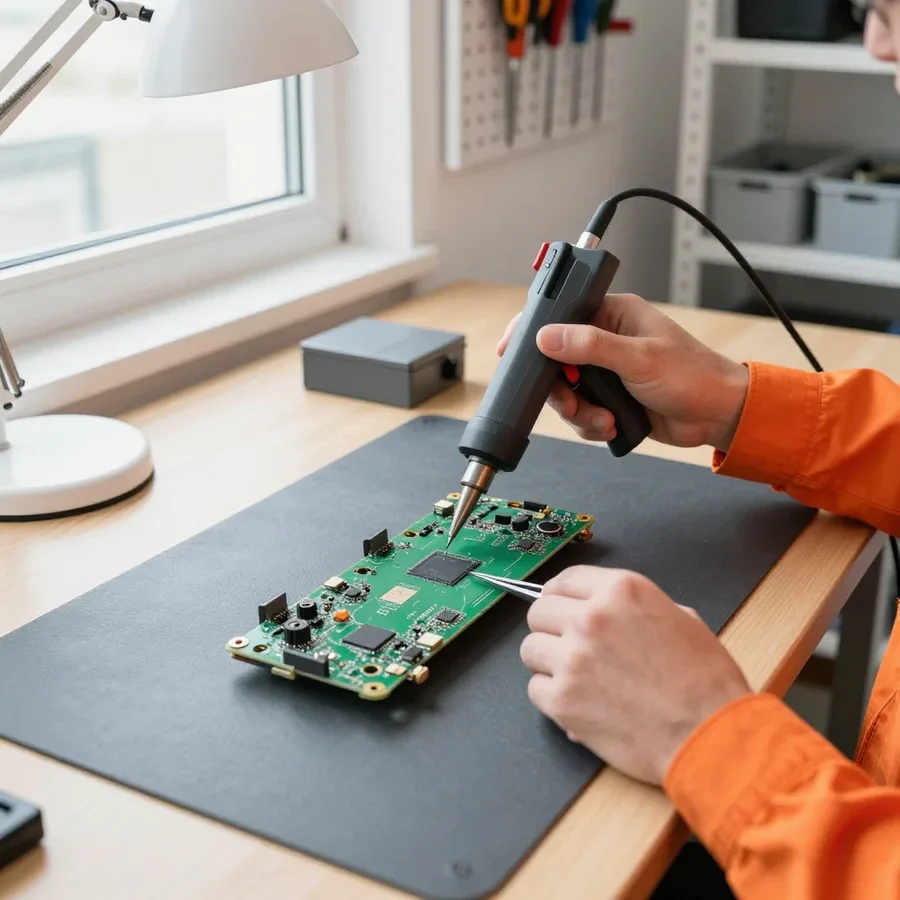
After the scope is approved, we perform soldering, component replacement, or cleaning — and test the laptop before returning it. On a Packard Bell motherboard, power circuits and connectors are most often re-soldered, and failed capacitors are replaced; on the matrix, ribbon cables and backlight are fixed; on the keyboard, stuck or oxidized contacts are addressed. Each component is tested separately after the intervention. The scope of work is fixed before starting, so if a related issue is found during disassembly, it is first agreed with you rather than done silently. After approval, the technician starts work and stays in touch along the way: if another defect is found, it is also discussed first, and only then addressed. On older models with tight layouts, hidden defects come up more often — there, care when removing the case and ribbon cables is essential.
We provide a 1-year warranty on labor and parts, and you can pay via Kaspi QR, Kaspi Red (instalments), bank card, cash, or bank transfer for companies — the same warranty applies whether you're replacing a screen or a keyboard. The terms are the same for motherboard soldering, cooling system cleaning, and power connector replacement: one year covers both the part itself and the quality of the work. You can pay via Kaspi QR, Kaspi Red (instalments), bank card, cash, or bank transfer for companies — you choose how to pay, there are no restrictions on payment type. The warranty covers both the part and the technician's work, so if the same issue comes back, you don't need to prove that we did the repair: just contact us, and we'll investigate the cause again. It's this combination of "part plus labor" under one warranty that removes the main fear clients have — that after the repair, the problem will be shifted onto them.
Diagnosing Packard Bell breakdowns comes down to a few patterns: they determine where the work starts and which components are checked first.
Tech Service technicians repair other appliances too — with the same 1-year warranty on labour and parts.
 Refrigerator Repair in Almatyfrom 3 000 ₸
 Washing Machine Repair in Almatyfrom 3 000 ₸
 Dishwasher Repair in Almatyfrom 3 500 ₸
 Oven Repair in Almatyfrom 3 000 ₸
 Cooktop Repair in Almatyfrom 3 500 ₸
 Air Conditioner Repair in Almatyfrom 3 500 ₸
 Boiler and Water Heater Repair in Almatyfrom 2 500 ₸
 Freezer Repair in Almatyfrom 6 000 ₸
 Tumble Dryer Repair in Almatyfrom 5 000 ₸
 Coffee Machine Repair in Almatyfrom 2 500 ₸
 Robot Vacuum Cleaner Repair in Almatyfrom 3 500 ₸
 Vacuum Cleaner Repair in Almatyfrom 1 500 ₸
 Microwave Oven Repair in Almatyfrom 2 000 ₸
 Hair Dryer Repair in Almatyfrom 1 500 ₸
 Iron Repair in Almatyfrom 3 000 ₸
 Electric Kettle Repair in Almatyfrom 2 500 ₸
 Mixer Repair in Almatyfrom 2 500 ₸
 Multicooker Repair in Almatyfrom 500 ₸

If your laptop screen is broken, turn the device off first, don't press on the display, and check the picture through an external monitor.
12 March 2026 · 11 minutes read
If your laptop freezes, the first thing to do is restart it and check Task Manager to see what's loading the CPU and memory.
25 January 2026 · 12 minutes read
If your laptop won't boot, first determine which of two states you're in: the device doesn't respond to the power button at all…
13 December 2025 · 12 minutes read
If your computer won't turn on, start simple: check the outlet, power cable, switch on the power supply, and the power button.
19 January 2026 · 13 minutes read








