Яна Э.Order No. ZK-2024-680 · 17 August 2024
oursСервис выбрал по карте — этот был ближе всего. Сервис оставил нормальное впечатление

A technician arrives within 60 minutes anywhere in the city. Free diagnostics, 1-year warranty on labor and parts.
Our own technicians4 to 20 years of experience




Repair prices
Below are typical symptoms and likely causes; the technician will pinpoint the exact cause during free diagnostics.
worn rollers, incorrect path gap
from3 000 ₸
power interruption, power supply failure
from6 500 ₸
overheating, banknote presence sensor failure
from6 000 ₸
dirty sensors, worn belts
from6 000 ₸
worn bearings, shaft imbalance
from6 500 ₸
dirty sensors, calibration failure
from6 000 ₸
natural wear, intensive use
from7 500 ₸
calibration failure, worn sensors
from6 000 ₸
1–2 hourstime
from 3,000 ₸cost
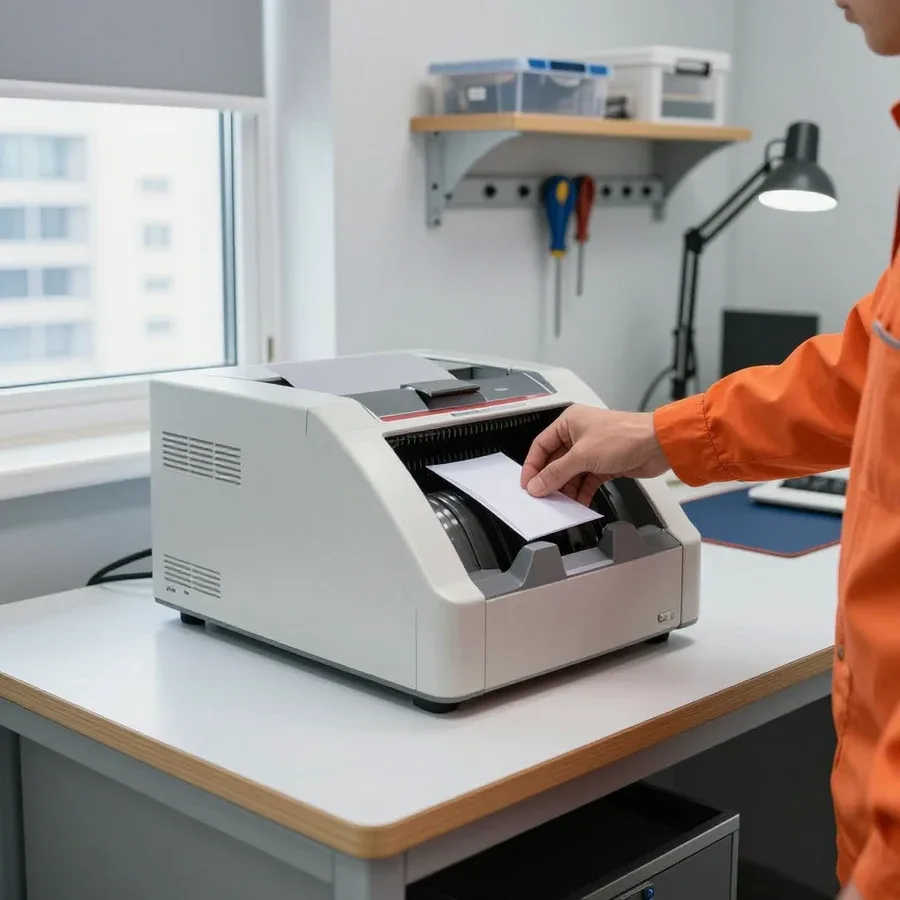 BeforeAfter

Five steps from request to checking the machine after repair.
Choose a convenient visit window so the technician arrives at the agreed time.
The technician comes anywhere in the city and inspects the equipment on site.
The technician checks the feed path, sensors, and rollers, then explains the cause and likely fixes.
You approve the scope of work and parts, and the technician starts the repair.
A test batch of notes in different denominations is run to check counting and ensure no jams.
We reply during working hours
Describe the symptom and your sorter model, and choose a convenient time for the technician's visit so they can bring the right tools and parts.

Warranty question? Call us
+7 (778) 046 88 53 experience7 years
PC and network repair engineer
 experience11 years
Senior mobile computer technician
 experience10 years
Laptop repair technician
 experience9 years
Motherboard repair technician
 experience16 years
Printer repair technician
 experience12 years
Computer repair technician
 experience18 years
All-in-one computer repair technician
Tech Service repairs banknote sorters in Astana: our technician arrives at your home or office within 60 minutes anywhere in the city, or repairs the machine at our service center. Diagnostics are free, and you get a 1-year warranty on labor and parts. The technician gives you the price after diagnostics.
A sorter is mechanics plus electronics, and almost every symptom points to a specific component. Let's break down what common complaints mean and where to look for the cause before taking the machine apart.
Most often, bills jam because of worn feed rollers and dirty pressure units, and less often because of misaligned transport gears. Rubber rollers lose grip on paper over time and slip, pressure plates get clogged with dust and lint, and gears, when skewed, feed the sheet unevenly and tilt it to one side. A jam in the same spot of the transport path is a clear sign of wear on a specific pair of rollers, not a random bent bill. If a bill jams again in the same area, the roller wear is irreversible — cleaning only gives a temporary effect, so the part is replaced. Before replacing, the technician checks the shaft play and the condition of the pressure plate: sometimes adjusting the pressure is enough, and the sheet grip is restored without a new part. Crumpled, taped, or damp bills jam even in a working machine more often — they should be manually rejected before counting.
A denomination isn't recognized when optical (UV, IR) or magnetic (MG) sensors are clogged with dust or their calibration is off for a new banknote series. Dust and lint on the UV and IR sensor windows scatter the signal, the MG magnetic sensor loses sensitivity to security features, and the machine sends the bill to the reject pocket as suspicious. Another cause is contamination of the transport path itself: paper particles settle on the sensors and distort the measurement across the entire sheet width. New banknote series often get rejected not because of a breakdown but because of outdated recognition firmware — this is checked before replacing sensors. First, the sensors are cleaned and tested, then the firmware version is compared with the current banknote series, and only after that is a decision made about replacing the unit. If the same side of a bill keeps getting rejected, the cause is more often the pressure geometry, not the electronics.
Not every breakdown is fixed on-site, and not every one needs to be brought to the workshop. Let's look at how to choose the format of work and what can really be solved at the client's location.
Our technician arrives within 60 minutes anywhere in the city and fixes most typical issues on-site — cleaning sensors, replacing rollers, setting up recognition. This format is in demand at currency exchange offices, bank branches, retail with cash revenue, and offices where a cashier counts money every day. The equipment doesn't go out of service during transportation, and testing happens right where it stands: the specialist sees how the machine handles the client's real bills, not a test deck. On-site, we do free diagnostics and immediately name the cause of the failure. For a location with a stream of customers, this is a decisive argument: while the device stays in place, the cashier keeps working instead of explaining to the queue why the count has stopped. Check in advance that there is free access to the back cover and a power outlet — this speeds up the specialist's work.
We take a sorter to the workshop when the power supply needs repair or the feed mechanism components need replacing, which can't be disassembled or tested under load on site. Such work requires opening the case, accessing the board, and running the mechanism with hundreds of banknotes — something you can't set up in an office or currency exchange. In this case, banknote sorter repair in Astana is done in our workshop, where our technician delivers the equipment, not a third-party service. We are the direct contractor, not an intermediary: the device is not resold to a third party, so the specialist who picked it up is responsible for it until return. Before sending it in, clarify which components require disassembly — this helps understand why the problem can't be resolved on site.
| Format | When it fits | What we do on site | What happens next |
|---|---|---|---|
| On-site repair | Cleaning, rollers, recognition setup | Free diagnostics and troubleshooting | Equipment goes back to work immediately |
| Workshop repair | Power supply, feed components, case disassembly | Diagnostics and device intake by a technician | Return after repair with a 1-year warranty |
| On-site diagnostics | Unclear cause of the error | Fault finding on site | Decision on the repair format |
Work starts not with disassembly but with diagnostics: the specialist reproduces the symptom, checks the mechanics, sensors, and electronics, and only then picks up tools. Here are the steps from your request to the final test run after the work.
Diagnostics are free: the specialist checks the mechanics, optical and magnetic sensors, and electronics, reproduces the symptom on test banknotes, and identifies the cause before any work begins. First, they run several banknotes of different denominations and series to catch the moment of failure — jamming in the feed path, false rejection, or a stop mid-count. Then they remove the side covers and inspect rollers, belts, and gears for wear, check sensor cleanliness, and verify cable integrity. Separately, they compare the machine's behavior with the error code on the display — this confirms the cause is found, not guessed from the external symptom. The cost is quoted after diagnostics, once the cause and scope of work are clear. Diagnostics are valuable not only for the conclusion — they filter out cases where cleaning and adjustment are enough and no disassembly or parts replacement is needed.
How long it takes depends on the issue: cleaning and adjustment on-site take less time than replacing components at the service center. A technician reaches the customer within 60 minutes anywhere in the city, so initial diagnostics and simple procedures are done on-site. If the symptoms indicate that disassembly and replacement of rollers or sensors are needed, the machine is taken to the service center — then travel time to and from is added. We can give a more precise timeframe only after diagnostics — the error code and how the feed mechanism behaves will show whether adjustment is enough or parts need to be replaced. In our experience, the longest cases are intermittent sensor failures that don't show up on every banknote — those have to be caught by running multiple test batches.
Some malfunctions can be fixed by cleaning rather than replacing parts. Let's look at when preventive maintenance is needed, how to tell it apart from a breakdown, and what signs indicate it's time to call a technician.
Dust on optical and magnetic sensors and dirty feed rollers are the main causes of inaccurate counting and jams that aren't related to part failure. UV and IR optical sensors get clogged with paper dust, lint, and paint particles, which reduces sensitivity to banknote security features. The MG magnetic channel, under a layer of grime, stops reading ferromagnetic marks correctly and lets suspicious banknotes through into the total count. Feed rollers get a sticky film from ink and dust, grip on paper decreases, and the banknote enters the transport path skewed — this leads to creases and repeated feeding. Regular cleaning extends roller life: a dirty roller slips, the banknote moves at an angle and gets creased more, and replacing a worn assembly takes more time and money than routine maintenance.
Frequency of maintenance depends on workload: the more intensively cash is counted, the more often sensors need cleaning and rollers need checking. With daily work on large volumes of banknotes, optical sensors and feed rollers get clogged faster than with occasional use, so the technician sets the interval based on the machine's actual load. In our practice, preventive cleaning and adjustment of optical and magnetic sensors is a separate service — it costs less than restoration and prevents most counting failures. A sign that it's time to clean is an increase in the share of banknotes in the reject pocket even though the same banknotes used to pass fine. If rejects grow without a change in the cash batch, start with cleaning: it eliminates half of unnecessary technician calls and saves time.
The warranty is just as important as the service itself. Let's look at what it covers, how we handle a recurring error, and why a direct contractor is fully responsible for the result.
The 1-year warranty covers both labor and parts: if the banknote sorter shows the same issue again after service, we inspect the machine under warranty. During this period, a single coverage applies to both the work performed and the parts we replaced while fixing the problem. Replacement of worn parts falls under the same responsibility: the recognition sensor, feed and transport rollers, belts, guides — everything we install is covered by the one-year term just like the technician's work. In our practice, it's usually the feed components that come back, because every banknote passes through them. The warranty on parts is just as important as on labor: a worn roller or sensor replaced during service is a separate part with its own term, and if it fails again, we check it first.
If the error returns, the technician re-diagnoses the machine and checks whether it's the same issue that was fixed or a new one. First, we compare the code on the screen with the previous visit: a match points to the same component, a mismatch to a neighboring one. Diagnostics remains free, and the follow-up inspection is covered by the 1-year warranty if the cause is the same. A repeated error on a different component is not a work defect but wear of a neighboring part, so please contact us with a precise description of how the machine's behavior changed: jamming at the input, denomination rejection, stopping mid-count. The more accurately you describe the symptom and when it occurs, the faster our technician will find the cause. The same code on the display can sometimes be caused by different components, and a detailed account from the owner shortens the search.
We are a direct provider: the work is done by our technician with 4 to 20 years of experience, not by a third party to whom the request is passed. He visits your home or works at the service center, performs diagnostics himself, and is responsible for the result — the request doesn't go to a subcontractor. With an intermediary, the warranty is blurred between the intake manager and the contractor: the intake manager refers to the contractor, the contractor to the intake manager, and the machine owner is left holding the bag. With direct service, responsibility for labor and parts lies with one service center, and under warranty you return to the same technician who did the repair. For banking equipment, this is crucial: a banknote sorter handles cash, and any uncertainty about who is responsible for a failure costs more than the breakdown itself. Our technician arrives within 60 minutes in the city, so a repeat visit doesn't stretch over days.
Clients often look for a technician for a specific machine brand. Here's what classes of equipment we service, how a request is coordinated, and where our technician travels.
We quote the price after a free diagnostic, once the cause is clear, and you can pay via Kaspi QR, Kaspi Red, bank card, cash, or bank transfer for companies. Before the visit, just describe the symptom: the machine won't turn on, jams banknotes, fails to recognize the denomination, or stops mid-count. Based on your description, the technician brings the right tools and suitable parts, confirms the cause on site, and agrees on the scope of work with you. Quoting a price before diagnostics is just guessing: the same symptom "doesn't recognize banknotes" could mean a simple sensor cleaning, a worn-out component replacement, or a feed mechanism failure. That's why we don't give a figure over the phone — first a free diagnostic, then a clear explanation and agreement on the scope. Warranty on labor and parts — 1 year.
Banknote sorters are used in banks, exchange offices, retail, and offices with cash turnover, and our technician comes to such clients on site. A city visit takes up to 60 minutes, so it's convenient both for a location with a steady flow of customers and for a small office with a single cash register. For cash handling, an on-site visit saves not the technician's time but the register's downtime: the machine stays at the workplace while it's being repaired nearby, and you don't need to transport it across town. If the breakdown requires disassembling the feed mechanism or replacing a component, the technician will tell you on site whether the job can be finished right there or whether it's more convenient to take the machine to the service center. In our practice, on-site visits are more often chosen by exchange offices and retail, where register downtime is more noticeable than transporting equipment.
Here are the key things a banknote sorter owner should keep in mind: what the breakdown depends on, when cleaning is enough, and when a component needs replacing.
Tech Service technicians repair other appliances too — with the same 1-year warranty on labour and parts.
 Refrigerator Repair in Almatyfrom 3 000 ₸
 Washing Machine Repair in Almatyfrom 3 000 ₸
 Dishwasher Repair in Almatyfrom 3 500 ₸
 Oven Repair in Almatyfrom 3 000 ₸
 Cooktop Repair in Almatyfrom 3 500 ₸
 Air Conditioner Repair in Almatyfrom 3 500 ₸
 Boiler and Water Heater Repair in Almatyfrom 2 500 ₸
 Freezer Repair in Almatyfrom 6 000 ₸
 Tumble Dryer Repair in Almatyfrom 5 000 ₸
 Coffee Machine Repair in Almatyfrom 2 500 ₸
 Robot Vacuum Cleaner Repair in Almatyfrom 3 500 ₸
 Vacuum Cleaner Repair in Almatyfrom 1 500 ₸
 Microwave Oven Repair in Almatyfrom 2 000 ₸
 Hair Dryer Repair in Almatyfrom 1 500 ₸
 Iron Repair in Almatyfrom 3 000 ₸
 Electric Kettle Repair in Almatyfrom 2 500 ₸
 Mixer Repair in Almatyfrom 2 500 ₸
 Multicooker Repair in Almatyfrom 500 ₸

If your laptop screen is broken, turn the device off first, don't press on the display, and check the picture through an external monitor.
12 March 2026 · 11 minutes read
If your laptop freezes, the first thing to do is restart it and check Task Manager to see what's loading the CPU and memory.
25 January 2026 · 12 minutes read
If your computer won't turn on, start simple: check the outlet, power cable, switch on the power supply, and the power button.
19 January 2026 · 13 minutes read
If your laptop won't boot, first determine which of two states you're in: the device doesn't respond to the power button at all…
13 December 2025 · 12 minutes read








