We repair Asus all-in-one PCs at your home: a technician arrives within 60 minutes anywhere in the city, diagnostics are free, and the work and parts come with a 1-year warranty on labor and parts. The technician names the cause of the fault before any work begins, our technicians have 4 to 20 years of experience, and you can pay via Kaspi QR, Kaspi Red, bank card, cash, or bank transfer for companies.
How an Asus all-in-one PC is built and why it is opened with care
An all-in-one PC puts the screen and the system unit into one thin case, so the components sit close together and affect each other. Knowing this layout helps to find the cause of a fault faster.
Which components make up an Asus all-in-one PC
- Display panel: the liquid crystal screen with its backlight and cable covers the whole front of the case and is the first part to suffer from knocks, pressure and overheating.
- Motherboard: it carries the processor, memory and connectors, so a board fault affects several functions of the device at once.
- Power supply: it converts mains voltage for the board and the backlight, and its failure looks like a completely dead device with no signs of life.
- Storage drive: a hard disk or an SSD holds the system and your files, and wear shows up as freezes, errors and slow startup.
- Cooling: the fan and heatsink carry heat away from the processor, while dust and old thermal paste cause noise and sudden shutdowns.
- Linked parts: because everything is cramped, a fault in one part often shows through another, for example overheating looks like freezes, so diagnostics go step by step.
How the Zen AiO, Vivo AiO and ExpertCenter lines differ in repair
The Zen AiO, Vivo AiO and ExpertCenter lines have different purposes, so their parts and mounts differ. Zen AiO belongs to the range with a thin case and a focus on the screen, Vivo AiO is built for home use, and ExpertCenter is made for office work. The size and resolution of the panels, the type of drive, the position of the fan and the way the back cover is fastened all vary. A panel from one line will not fit another even with a similar diagonal, because the cables and connectors differ. Power supplies also differ in output and plug shape. Tell the technician the exact model from the sticker on the back panel: it speeds up part selection and prevents an error when ordering.
Why a thin case needs careful opening
We open an Asus all-in-one PC carefully because the screen is held by clips or adhesive tape, and the panel cables are very fragile. One clumsy move tears a cable, and instead of replacing a fan you end up replacing the screen. That is why our technicians with 4 to 20 years of experience first work out how the front part of the specific model is fastened, and only then remove it, spreading the force around the edge. A thin case does not forgive uneven pressure, and tiny screws are easy to lose. Opening it yourself without the right tool often breaks the clips, and the frame stops sitting flush. A damaged clip also never restores the original rigidity of the case, and over time gaps appear that let dust in. If the case has been opened before, tell the technician so that he looks for hidden damage.
Which symptoms show which component of an Asus all-in-one PC is faulty
One symptom can hide different causes, but it sets the direction of the search right away. Below are the most common signs and the components the technician checks first.
What is checked when the all-in-one PC does not turn on
If an Asus all-in-one PC does not turn on, we start with the power chain: the socket, cable, power supply, button and motherboard. First the technician looks at whether the indicator lights up and whether the fan makes a sound when the button is pressed, since this shows whether voltage reaches the board. A complete lack of signs of life more often points to the power supply or the cable, while an instant shutdown after startup points to overheating or a board fault. The power supply is checked by its output voltage, and the board is inspected for traces of liquid and swollen capacitors. Then the technician unplugs the cables and checks the connector contacts, because an oxidized contact has the same effect as a faulty part. Before you call, plug the cable into a different socket: it rules out the simplest cause and saves time during the visit.
What a black screen, lines and flickering mean
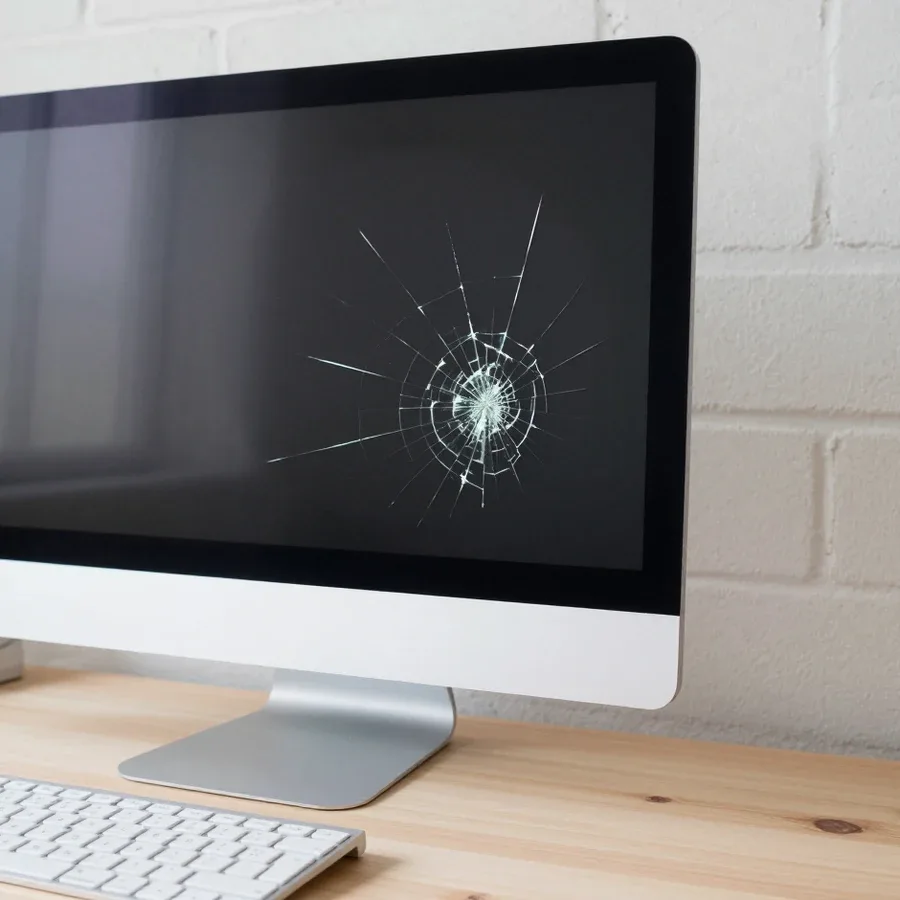
If the startup sound is there but the picture is not, we check the panel backlight, the cable and the panel itself. A dim, barely visible picture in the side light of a lamp points to the backlight rather than the motherboard. Horizontal and vertical lines, flickering and colored spots are more often tied to the cable or the panel, especially after a knock or pressure on the screen. If the lines disappear when the tilt changes slightly, the technician suspects the cable. If the picture vanishes a few seconds after startup, the cause may be overheating or a failed backlight converter on the board, and this is checked separately. A crack in the glass means replacing the whole panel, and that option is assessed after diagnostics. Do not press on the screen with your fingers or wipe it with a wet cloth while the device is plugged in.
Table of symptoms and likely components
| Symptom | Likely component | What the technician checks |
|---|
| Won't turn on | Power supply, board | Output voltage of the unit |
| Black screen with sound | Backlight, cable | Glow in side light |
| Lines on the screen | Cable, panel | Picture when the tilt changes |
| Noise and self-shutdown | Fan, heatsink | Temperature under load |
| Slow startup | Storage drive | Drive condition and errors |
| Glitches and restarts | Memory | Memory module test |
Which work and parts bring an Asus all-in-one PC back to normal
Some faults are fixed by servicing without replacing parts, and some need new components. Below is what the technician does about overheating and freezes and how a part is chosen.
Dust cleaning and thermal paste replacement for overheating
For overheating, we take the all-in-one PC apart, blow the dust out of the heatsink, check the fan and replace the thermal paste between the processor and the heatsink. Dust clogs the heatsink fins, heat stops leaving, the fan spins up to the limit and makes noise, and the processor lowers its frequency or the device shuts itself down. Dust builds up gradually, so the first signs are only slightly louder fan noise and a warm back panel. Old thermal paste dries out and transfers heat worse even on a clean heatsink. If the fan is noisy because of a worn bearing, cleaning will not help and it is replaced. After assembly the technician lets the device run under load and watches the temperature. If the fan noise grows during simple work, do not wait until the device starts shutting down on its own: servicing at an early stage goes more easily.
Drive and memory replacement for freezes
An Asus all-in-one PC most often lags because of a worn hard disk, and replacing it with an SSD noticeably speeds up system startup. A mechanical disk reads many small files slowly, so the system starts for a long time and programs open with a delay. An SSD removes this queue but requires moving the system or a clean installation. A lack of memory gives similar symptoms: windows switch with jerks and the browser closes by itself. The memory modules sit in a separate compartment or on the board, and the replacement option depends on the model. If freezes remain after the disk is replaced, the technician tests the memory modules separately and checks the processor temperature, since overheating causes the same faults. Save a copy of your important files while the device still starts, because a disk with errors can fail completely.
Original and compatible parts
| Parameter | Original part | Compatible part |
|---|
| Selection | By model and part number | By size and connectors |
| Compatibility | Designed for a specific model | Needs a check of parameters |
| Service life | Same as factory parts | Depends on the maker |
| Where it fits | Panel, board, power supply | Fan, memory, drive |
How a technician's visit to your home in Astana goes
A visit is built around diagnostics on the spot and a clear decision for you. Below is what happens after your request, how the inspection goes and how to prepare in advance.
What happens after your request
After your request a technician heads to you and arrives within 60 minutes anywhere in the city, so Asus All-in-One PC repair in Astana does not require carrying a heavy device to a service point. An all-in-one PC with a large screen is awkward to pack, and during transport it is easy to damage the panel and cables. On site the technician immediately sees how the device is connected, in what conditions it works and whether there are heat sources nearby that affect overheating. The trip takes minimal time, and you do not need to look for packaging or stay without a computer while it is shipped. We work as a direct contractor: our own technician comes, not an intermediary, and he talks to you directly. Clear some space near the socket in advance so that he can start the inspection at once.
How free diagnostics on site go
Diagnostics are free: the technician inspects the all-in-one PC, checks power, heating, the drive and the screen, and names the cause of the fault. First he finds out when and under what conditions the failure appeared, then inspects the connectors, ventilation openings and the case. Next come the power supply voltage, the temperature during work, the condition of the disk and the memory. If the cause is obvious right away, the technician explains it on the spot; if an extra check is needed, he says which one and what it will show. The specialist explains the result in plain words and shows which component causes the problem. The decision about the repair stays with you, because the technician names the cost after diagnostics. Ask which components were checked and what remains in question: that way you will understand the full picture.
What to do before the technician arrives
- Describe the symptom: write down what is happening, what it started after and which sounds you hear, since an exact description shortens the path to the cause.
- Find the model: look at the sticker on the back panel, because the technician selects parts by it and understands the features of the case.
- Save your files: if the all-in-one PC still starts, copy important data to an external drive or to the cloud before the visit.
- Clear access: move things away and prepare the socket so that the specialist can turn the device and open the back panel.
- Unplug it: if there is a smell of burning or liquid got in, pull the plug from the socket and do not switch the device on until the technician arrives.
What the warranty gives and how the cost of work is formed
Before ordering it is useful to know what result you get after the work, what the final cost consists of and how you can pay. These questions are covered below in order.
1-year warranty on labor and parts
We give a 1-year warranty on labor and parts, and it covers any Asus All-in-One PC repair in Astana. A year is the period for which the technician is responsible for both the completed work and the installed part. For the owner this means that the replacement of a panel, fan or drive is protected for the same period as the technician's labor. So it is worth asking about the warranty before the work starts, not after: then you know in advance what protection you can count on. Such a warranty removes the main fear when choosing a contractor: the money is spent on the device, not on a one-off attempt. Ask the technician which components were included in the work and write them down, because it is easier to recall the scope of the repair when you apply under the warranty.
What the cost depends on and when it is named
The technician names the cost after free diagnostics, since it depends on the component, the model and the type of part. Replacing a fan and replacing a panel are not comparable in the amount of work, and parts for different lines differ. Original and compatible parts also cost differently, and the technician explains the difference in service life and compatibility. Difficult disassembly adds time: in a thin case the screen has to be removed carefully. If diagnostics reveal several problems, the technician singles out the main one and explains which work can be done at once and which can wait. That is why an exact total is possible only after inspection, and this is more honest than promising a number at random. Ask for an explanation of what the total consists of, and compare the part options, not only the amount.
Technician experience, direct contractor and payment
We have technicians with 4 to 20 years of experience, and the repair is done by our own technician without intermediaries. Such experience covers different generations of equipment, so the technician recognizes typical faults of Asus all-in-one PCs at the first inspection. You talk directly to the person who came and holds your device in his hands, and you can ask any question about the cause and the part options. Experience matters especially for hidden faults, when there is one symptom but several causes, and the right order of checks saves time. This makes it easier to decide without haste and without guesswork. He will tell you how to extend the life of the device: check the ventilation openings for dust, do not place the all-in-one PC right against a wall and do not cover the case with cloth. You can pay in any convenient way, since we accept Kaspi QR, Kaspi Red, bank card, cash, or bank transfer for companies.
When an Asus all-in-one PC repair pays off
Below are the main takeaways of the article: what the owner of an Asus all-in-one PC should know about symptoms, work and the visit before making a decision.
- Design: an Asus all-in-one PC combines the screen and the system unit in a thin case, so opening it yourself easily damages cables and clips.
- Symptoms: failure to start, a black screen, lines, noise and freezes point to different components, and only diagnostics determines the exact cause.
- Parts: cleaning and new thermal paste solve overheating, an SSD speeds up startup, and the choice between an original and a compatible part depends on the component.
- Preparation: write down the symptom and the model, save your files and clear access to the socket and the back panel before the technician arrives.
- Terms: diagnostics are free, a technician arrives within 60 minutes anywhere in the city, and the warranty is 1 year on labor and parts.